


Marketing Operations & Process Design
Overview
I built these systems because I was the one doing the work and felt the friction firsthand. Thus, this section features the operational layer I have built these years so that the project, whether it is campaigns or creative work, could ship consistently across teams, language barriers and time zones, without everything depending on one person to know everything.
1. Knowledge Library & Information Architecture
As cross-functional and country teams collaborate closely, whether it is linear or loop type of projects, having a SSOT (single source of truth) is essential to ensure everyone stays in the same loop and guarantees consistency.
The Problem
When files created by different people, it tends to live in different places and named differently. There is no version logic and status layer. The same project name could appear across different team libraries.
The Solution
A three-parts interlocking system with filter action, consistent naming conventions, and a centralised glossary index. This ensures that any assets is easily accessible to everyone.
Existing setup

Proposed structure system
01 Project Glossary
This section features an index with canonical slug with rejected aliases; proper typing and structure for specific terms.
Canonical Slug
TK App
Key AI
TK (TradingKey)
BAU
Retired (do not use)
TK APP, Tk app, TKApp
KeyAI, KeyAi
Tradingkey, Trading Key
bau, general
02 Naming Convention
This has two different types - time-bound and evergreen. Time bound files carry a date prefix, and evergreen carry a version prefix (if needed). Additional main fields should be separated by underscores, and hyphens for sub-descriptor only.
Time-bound files
For campaigns, content copywriting, reports
[Project]_[Doc Purpose]_[YYYYMMDD]
Evergreen files
For tracker, templates, research
[Project]_[Doc Purpose]_v[n]
03 Library Filter
The library is reorganised from team silos to project buckets. Status, team, and doc type are set as filters. Additional sorting requirements are also given to project names and last update dates, with the automation of updating via App Script.
Proposed new setup
The file names here have been amended for privacy reasons.

Outcome & Reflections
The main existing issue here was behavioural, not just technical People are naming files with no authoritative sources telling them what is right for everyone. With this new interlocking rules, each piece depends on the others. The Glossary exist to have a background for everyone to align on the naming convention. The Convention has to be followed before the Library stays clean and transparent. This is a chain of infrastructure thinking, not just tidying up a library.
This setup results in any team members to locate any file without being restricted by teams.
2. Campaign Documentation
This is a single command centre for most marketing campaign. I built it in Google Sheets because it is accessible to all teams regardless of location or tool access, including Chinese counterparts who are unable to use most external platforms.
The Problem
When a project run across different teams from different region and languages, it tends to break down at every handoff. There can be unclear ownership, no single version of what was approved or pending, and everyone set up their own tabs that did not look like a cohesive document / playbook.
The Solution
A eight-tab production system covering the full campaign lifecycle. Each tab has a specific function, and it serves as a single source of truth for the project. This document act as a directory that any stakeholders will be able to access this one file any time when the campaign is ongoing. The template also serves as a baseline for future campaigns.
01
Objective
This is the alignment anchor before any work begins. A bilingual brief that shows the mechanics, campaign period, budget assigned, KPIs, and target audience.

02
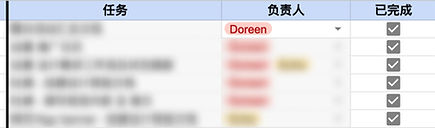
Stakeholders & Responsibilities
This section shows the roles, names and responsibilities with a checklist and link to external section/files. Anyone can identify who to contact without asking around.
03
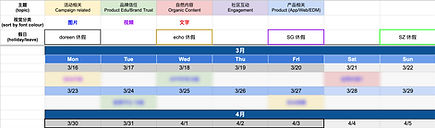
Content Calendar
A week-by-week schedule by type of content, format, and platform. It also shows the foreseeable blockers, such as public holidays.
04
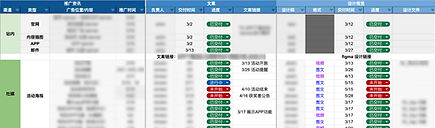
Creative Workflow & Asset Delivery
A per-content tracker, showing the status of each content, copy owner and expected, visuals deadline, and file links to final visuals.
05
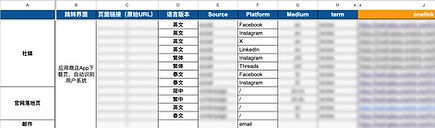
External links & UTM links
Any key UTM links, whether it is shortened or destination, are set before going live. It also shows the status of any additional links added.
06
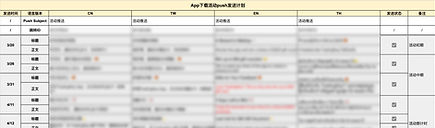
Product Copywriting
This is specifically for any product placement copywriting, such as in-app push. It is segmented by language, sent date, and approval status.
07
Approval Log
Any crucial review/issues that involve the upper management approval will be logged here. This protects everyone when decisions are questioned later.

08
Post-Campaign Learning
This is the performance snapshot and learnings. A document that records the execution into institutional learnings for the next campaign. Any stats are tracked in external dashboard.
Outcome & Reflections
The key insight here is that a campaign template is not just a document, it shows a full lifecycle and maximum clarity for the team. Each tab activates at a specific point in the timeline, and the Post-Campaign Learning feeds back into Objective tab of the next campaign. This loop is what turns a one-time tool into institutional knowledge. Although every campaign is unique to its different requirements, but the fundamentals here are ready to scale and improvise for each nature of the campaign.
3. Creative Brief Template & System
A clear creative brief and request system helps the designer and all the team to have a clear visibility of timelines, capacity, and streamlined communication.
The Problem
As the in-house designer functioning as a shared resource across teams, design requests arrived from multiple teams through individual chats. Each team assumed full access to the same designer capacity, leading to overlapping deadlines, unclear communication and no single source of truth on workload. Without a standardised template, requests were made vaguely and projects were not fully defined, which often led to misaligned drafts and repeated revision cycles.
The Solution
To cater to different working habits of different teams rather than forcing one tool on everyone, I built a request ticketing system and a standard creative brief on both notion and google docs.
Request ticketing system (on Notion)

The Notion board's real job wasn't to track tasks, it was to make capacity visible to everyone at once. This shaped the status structure. Rather than just the default New → In Progress / On Hold → Done flow, I incorporated Queued, Blocked, and Deprioritised for a difference visibility rather than buried in an "On Hold" thread. This would display whose responsibility the delay actually was.
At the top of the board sits a manually updated 'Live Summary' which shows the live capacity snapshot.
I also built a standardised 'New Design Request' template button so every income request starts from the same set of prompts instead of a blank card. This was a direct response to the vagueness problem and countless of revisions which can reduce the continuous mismatch of expectations.
View New Design Request template here: Link to document
Outcome & Reflections
The core issue here was about transparency. Teams were operating in silos with no shared view of demand on a shared resource, which made every new request feel invisible. Offering different system also removed adoption barrier for teams with different habits, so the fix didn't depend on getting everyone to change how they worked. The result was fewer revision rounds, clearer accountability over how design time was spent, and a workload pipeline that was visible to everyone.